
AI Front Matter
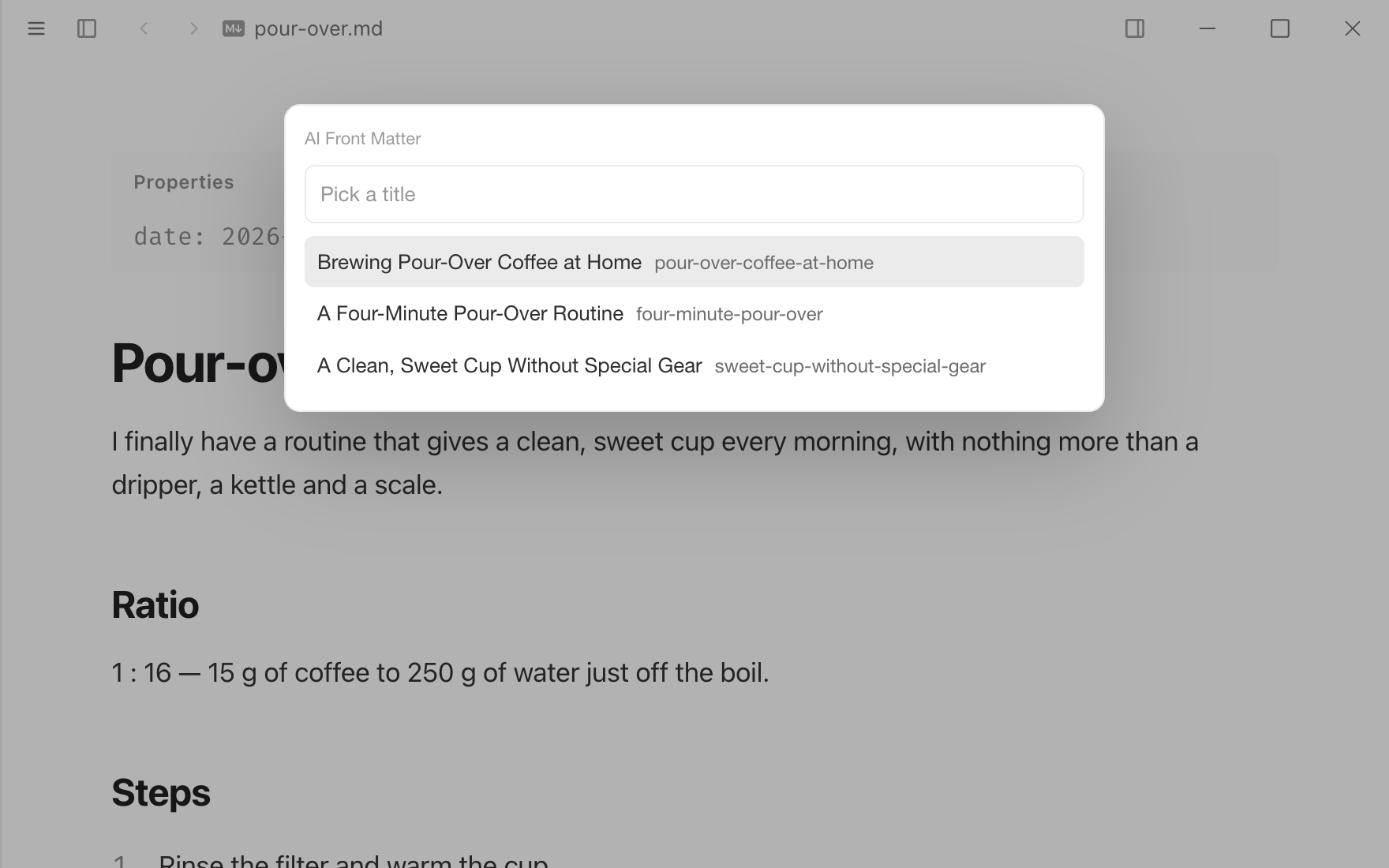
Writes a title, a one-line description, tags and a URL slug into a note's front matter with your AI model, reusing the tags your other notes already use.
Permissions
When you install it, Typora asks you to allow it to:
- Read and edit the open document.
- List and read files in the open folder.
- Send text to the AI model you set up in Typora's Settings ▸ Intelligence.
Sandboxed code. Runs code in a locked-down worker that can only use the API its permissions allow.
What it adds
- Commands
- Generate Front Matter, Suggest Tags, Suggest a Title
- Menu items
- 2
- Settings
- Title, Description, Tags, Slug, Replace existing values, Reuse tags from the open folder, Most tags, Description key, Tags key, Write new lists as, Language, Characters sent
- Window code
- Runs in a sandboxed worker in each window.
Readme
AI Front Matter
Front matter for notes and blog posts, written by your AI model:
---
title: Brewing Pour-Over Coffee at Home
description: A ratio, a grind size and a four-minute routine for a clean, sweet cup without special gear.
tags: [coffee, recipes, pour-over]
slug: pour-over-coffee-at-home
---
Run it from the command palette or the / menu:
| Command | What it does |
|---|---|
| Generate Front Matter | Suggests three titles to pick from, and writes a description, tags and a slug. |
| Suggest Tags | Adds tags to the ones the document already has. |
| Suggest a Title | Five titles to pick from. |
Tags you already use. Before asking, it reads the tags of up to 300 notes in the folder open in the window and asks the model to prefer them, spelled the same way, so JavaScript doesn't come back as js in one note and javascript in the next. New tags follow the style of the existing ones.
Everything else in the front matter stays as you wrote it: other keys, comments, nested values and the style of existing lists. The change is one undo step. Values the document already has are kept unless Replace existing values is on. The front matter works with the WordPress extension, which publishes title, description (as the excerpt), tags and slug.
Setup
It uses the model you set up in Settings ▸ Intelligence — any OpenAI-compatible server (OpenAI, Anthropic, DeepSeek, OpenRouter, Ollama, LM Studio, …) or a coding agent such as Claude Code. There is no key to enter here, and nothing goes through a Typora server.
Options
| Option | Default | |
|---|---|---|
| Title, Description, Tags, Slug | on | What Generate Front Matter writes. |
| Replace existing values | off | Off keeps a title, description or slug the document has, and adds to its tags. |
| Reuse tags from the open folder | on | Read other notes' tags and prefer them. |
| Most tags | 5 | |
| Description key | description | Or excerpt, summary. |
| Tags key | tags | Or keywords, categories. |
| Write new lists as | [a, b] | Or one item per line. |
| Language | the document's | e.g. English to get English titles for a Chinese note. |
| Characters sent | 12000 | How much of the document goes to the model. |
What is sent to the model
The document's text from the start, up to Characters sent, its current front matter, and the tag list of the folder (tag names only, not the other notes). Nothing is sent until you run a command.
Permissions
ai— send the text above to your model in Settings ▸ Intelligence.document: "write"— read the document and write its front matter.workspace: "read"— read the front matter of the notes in the open folder for their tags. Switch off Reuse tags from the open folder and it reads no other files.